AI is evolving fast, but in DevOps, the “cool factor” of a chatbot fades if it can’t see your infrastructure. The real question isn’t “Can AI answer questions?” it’s:
Can AI understand what is happening in my pipeline, my cluster, my logs, and my production systems—in real time?
This is where the Model Context Protocol (MCP) changes the game. While most view MCP as a tool for local developer productivity, for SREs and Platform Engineers, MCP is the standardized integration layer that turns a generic LLM into a Production-Aware Copilot.
The Architecture: How MCP Connects the Dots
In a traditional setup, an AI is “blind” to your private VPC. You have to copy-paste logs into a prompt. MCP changes the topology by introducing a Client-Server-Resource model.
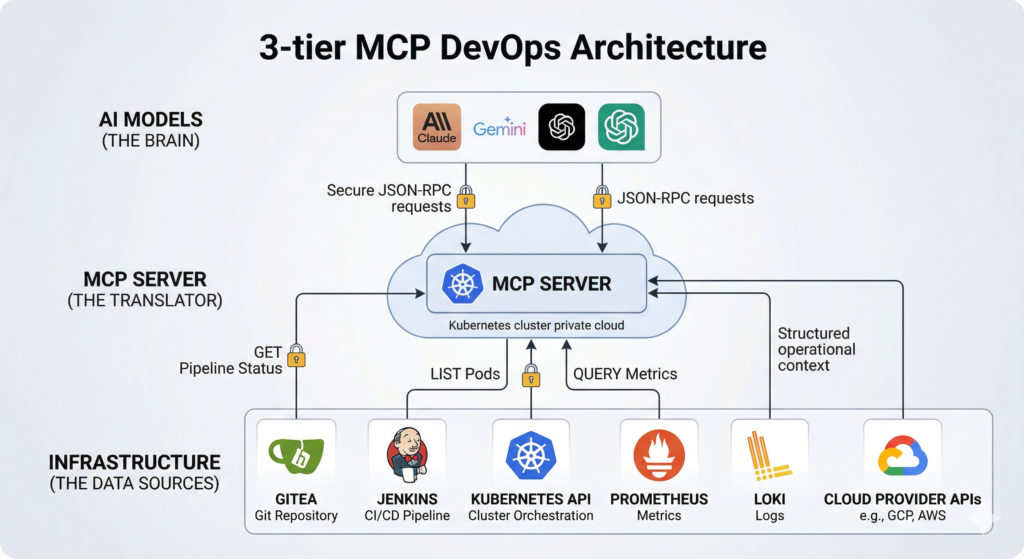
Visual 1: The MCP DevOps Ecosystem
Top Tier: AI Models (Claude 3.5, Gemini 1.5, GPT-4o) acting as the “Brain.”
Middle Tier: The MCP Server acting as the “Translator” (hosted in your K8s cluster or GCP).
Bottom Tier: The “Infrastructure” (Gitea, Jenkins, Kubernetes API, Prometheus, Loki).
Arrows: Show JSON-RPC requests flowing from the Brain to the Translator, and structured data flowing back.
The Two Transports: stdio vs. HTTPS
When implementing MCP, you’ll choose between two primary transport methods. Understanding the difference is critical for DevOps security.
Feature
stdio MCP Server
HTTP/HTTPS MCP Server
Communication
Standard Input/Output pipes.
JSON-RPC over Streamable HTTP.
Lifecycle
Client launches it as a subprocess.
Runs as a long-lived service/container.
Best For
Local dev, IDE plugins, CLI tools.
Shared team tools, Production clusters.
Security
Local process isolation.
TLS, OAuth, Bearer Tokens, RBAC.
Real-Time DevOps Use Cases
1. Automated Pipeline Triage
When a CI/CD pipeline fails, the “context switching tax” is high. An MCP-integrated AI can:
Identify the failed stage in Jenkins/GitHub Actions.
Pull the specific job logs.
Cross-reference the Git diff in Gitea to see code changes.
Result:“The build failed because the new PAYMENT_API_KEY is missing from the Secret Store.”
2. Kubernetes Rollout Troubleshooting
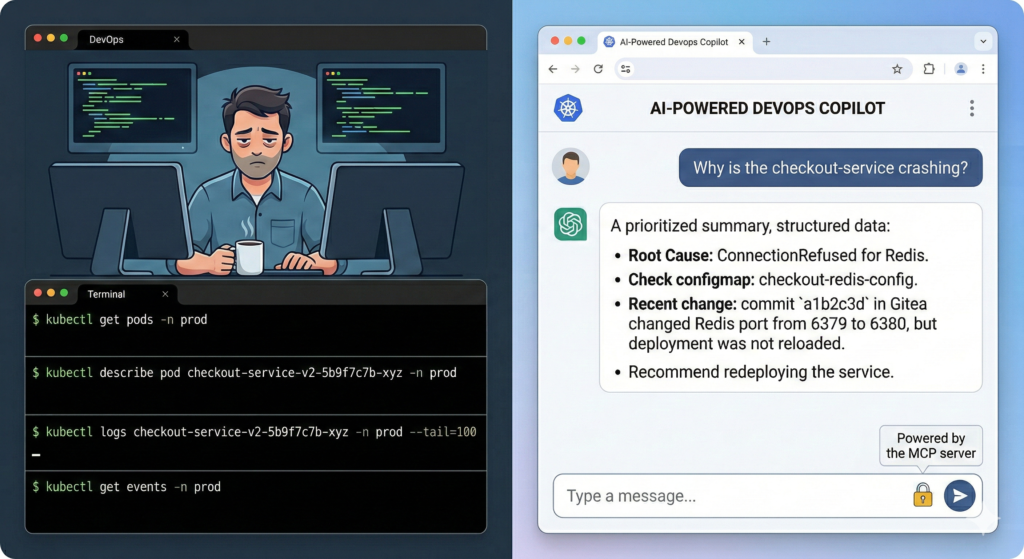
Visual 2: The “Operational Reasoning” Loop
Left Side: A terminal showing 5 different kubectl commands (get pods, describe, logs, events).
Right Side: A single natural language chat box: “Why is the checkout-service crashing?” with the AI responding with a summarized root cause.
Instead of manually running commands across five pods, you ask: “Why is the checkout-service stuck?”
Through MCP, the AI discovers:
ImagePullBackOff errors in cluster events.
A typo in the image tag in the latest ArgoCD sync.
Resource constraints on the node pool in GCP.
3. Incident Root Cause Analysis (RCA)
During an active incident, an AI agent with MCP access acts as a “second pair of eyes” correlating data across the stack:
Metrics: Prometheus shows a 40% spike in 5xx errors.
Logs: Loki logs show database connection timeouts.
Changes: Gitea shows a database migration was merged 5 minutes before the spike.
Conclusion: The migration lacked an index, causing table locks.
Production-Safe Design: “The Guardrails”
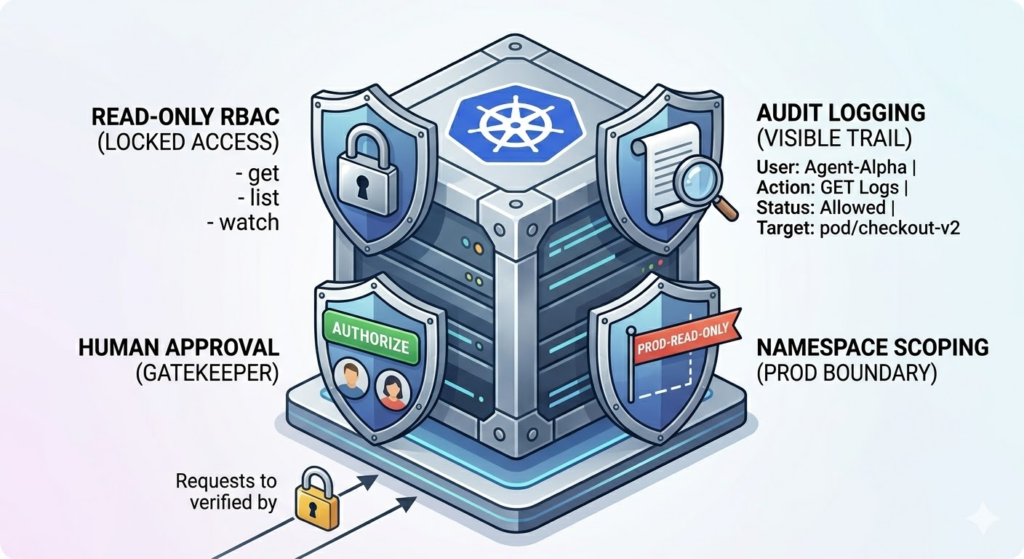
Giving an AI access to production requires a “Safety First” architecture. You don’t just “hand over the keys.”
Read-Only First: Give the MCP service account get, list, and watch permissions only.
Strict RBAC: Use Kubernetes RBAC to scope the MCP server to specific namespaces (e.g., prod-read-only).
Human-in-the-Loop: Use AI to diagnose and suggest commands, but require a human to execute the kubectl apply or terraform apply.
Audit Everything: Since HTTPS MCP servers use standard web protocols, log every request to see exactly what data the AI is fetching.
Why This Matters for Platform Engineering
The goal of Platform Engineering is to reduce cognitive load. By building an internal MCP server that connects your Gitea, Jenkins, and Kubernetes environments, you aren’t just giving developers a chatbot—you’re giving them an Operational Control Plane they can talk to.
In short: MCP turns AI from a generic narrator into an active participant in your DevOps lifecycle.
Leave a Reply