Let’s face it, the world of Artificial Intelligence (AI) can feel overwhelming. From buzzwords like “Machine Learning” and “Deep Learning” to complex terms like “hyperparameter tuning” and “model deployment,” it’s easy to get lost in a sea of technical jargon. But fear not, developers and data enthusiasts! Google Cloud’s Vertex AI is here to make your journey into AI smoother, more integrated, and frankly, a lot more fun.
This blog on InfraDiaries will take you on a friendly tour through the world of Vertex AI, explaining what it is, why it’s a game-changer, and how it can empower you to build, deploy, and manage your AI models like a pro.
So, What is Vertex AI Anyway?
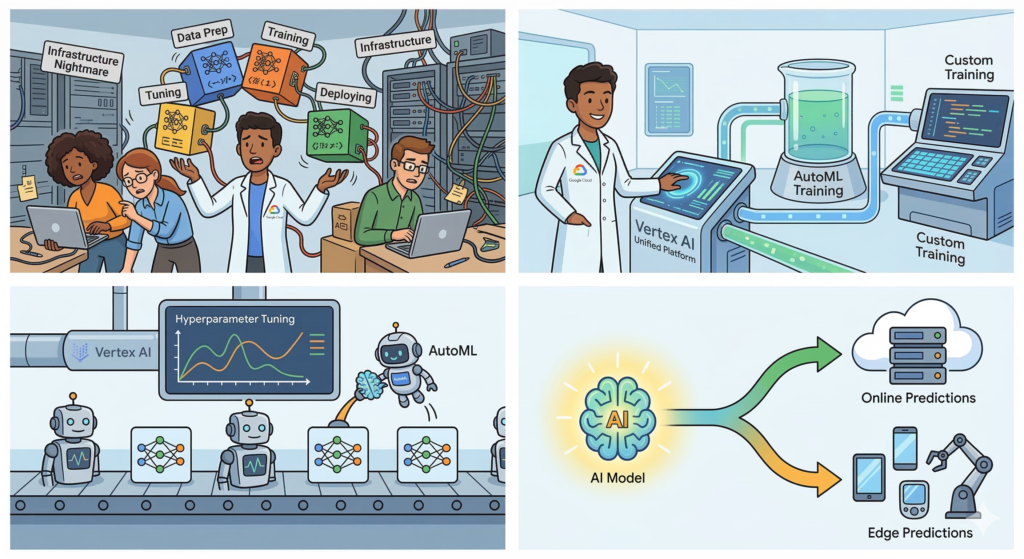
Think of the old days of managing servers, manually scaling resources, and piecing together different tools for training, tuning, and deploying your models. It was like trying to assemble a complex Lego set without instructions while juggling fiery torches! Vertex AI changes all that.
Simply put, Vertex AI is Google Cloud’s unified machine learning (ML) platform. It provides a single, cohesive environment for every step of your ML workflow, from data preparation and model training to deployment and management. It’s like having all your favorite ML tools under one roof, talking to each other seamlessly.
Think of it as the ultimate toolbox for ML professionals. Need to explore data? There’s a tool for that. Want to train a model? Covered. Deploying your model to production? Vertex AI streamlines it. It takes care of the infrastructure so you can focus on what you do best – building brilliant models.
Why Should You Care About Vertex AI?
You might be thinking, “This sounds great, but why should I switch from my current setup?” Here are a few compelling reasons why Vertex AI is making waves:
- Unified and Integrated: No more switching between different tools and services for different stages of the ML lifecycle. Vertex AI brings everything together, making your workflow smoother and more efficient.
- Fully Managed Infrastructure: Focus on your code and models, not on managing servers, configuring VMs, and scaling resources. Vertex AI automatically handles the underlying infrastructure, letting you scale with ease.
- Built-in AutoML: For those new to AI or wanting to jumpstart their development, Vertex AI offers powerful AutoML capabilities. This means you can build high-quality models even with minimal ML expertise.
- Advanced ML Capabilities: Don’t let the ease of use fool you. Vertex AI caters to experienced ML practitioners too, offering features like custom training, explainable AI (XAI), and MLOps tools for robust model deployment and monitoring.
- Seamless Integration with Google Cloud: Vertex AI plays beautifully with other Google Cloud services you already use, such as BigQuery for data warehousing and Cloud Storage for data storage.
- Edge to Cloud Deployment: Deploy your models not only to the cloud but also to edge devices, enabling real-time inferences and lower latency applications.
Let’s Peek Inside the Vertex AI Toolbox:
Vertex AI isn’t just one service; it’s a collection of powerful tools designed to address specific needs within your ML workflow. Let’s explore some of the key components:
1. Vertex AI Workbench:
Think of Vertex AI Workbench as your command center. It provides a collaborative environment, particularly focused on Jupyter Notebooks, for developing and managing your entire ML workflow. Whether you’re exploring data, building custom models, or experimenting with different algorithms, Workbench offers a familiar interface with built-in integrations for popular libraries and datasets.
- Key Features: JupyterLab integration, persistent disks, easy access to BigQuery and Cloud Storage, built-in notebook environments.
- Why You’ll Love It: A unified interface for development and experimentation, reducing context switching and streamlining your work.
2. Vertex AI Training:
Once your data is ready, it’s time to train your model. Vertex AI Training offers flexible options for training both custom and AutoML models. You can use popular frameworks like TensorFlow, PyTorch, and XGBoost, and leverage distributed training for speeding up the process.
- Key Features: Support for custom and pre-built training containers, hyperparameter tuning, managed training jobs, integration with TensorBoard for monitoring.
- Why You’ll Love It: Scale training jobs effortlessly, optimize model performance with automated tuning, and track progress visually.
3. Vertex AI Models (AutoML and Custom):
Vertex AI gives you the best of both worlds.
- Vertex AI AutoML: No ML background? No problem! AutoML automates the complex aspects of building a model, such as neural architecture search and feature engineering. It allows you to build high-quality models for tasks like image classification, natural language processing, and tabular data prediction with minimal effort.
- Vertex AI Custom Training: For experienced ML developers, Vertex AI provides full control over the training process. You can bring your own containers, define your own training pipelines, and use advanced configurations for maximum flexibility.
4. Vertex AI Endpoints and Predictions:
The ultimate goal of any ML model is to make predictions. Vertex AI simplifies the deployment and management of your models, enabling both online and batch predictions.
- Online Predictions: Deploy models to an endpoint for low-latency inferences in real-time applications, such as a product recommendation system on your website.
- Batch Predictions: For processing large datasets in one go, Vertex AI facilitates batch prediction jobs, which are useful for tasks like monthly sales forecasting.
- Key Features: Automated scaling for endpoints, support for multi-model serving, monitoring for model health.
- Why You’ll Love It: Get models into production faster, scale seamlessly to handle inference requests, and ensure reliable performance.
5. Vertex Explainable AI (XAI):
AI models are often considered “black boxes,” making it difficult to understand why they make certain decisions. Vertex Explainable AI addresses this challenge by providing insights into your model’s predictions. This is crucial for building trust, debugging model behavior, and ensuring fairness.
- Key Features: Integrated with both AutoML and custom models, provides feature attribution (understanding which features influenced the prediction the most), and helps identify biases in your models.
- Why You’ll Love It: Build more transparent and trustworthy AI applications, gain insights for model improvement, and comply with regulatory requirements.
6. Vertex AI Pipelines:
Managing individual steps in an ML workflow can be complex. Vertex AI Pipelines allows you to orchestrate your entire ML process as a series of repeatable steps, from data ingestion to model deployment. This fosters collaboration, ensures reproducibility, and makes it easier to manage complex ML systems.
- Key Features: Support for KubeFlow Pipelines and TensorFlow Extended (TFX), visual pipeline editor, automated execution of pipeline steps, integration with other Vertex AI components.
- Why You’ll Love It: Build scalable and maintainable ML workflows, automate repetitive tasks, and easily experiment with different configurations.
Putting It All Together: A Simple ML Workflow on Vertex AI
Now that you’ve met the main characters, let’s see them in action. Here’s a typical workflow you might follow when building and deploying a custom image classification model with Vertex AI:
- Data Preparation (Vertex AI Workbench/BigQuery): Connect to your image data stored in Cloud Storage or BigQuery, explore the dataset using Vertex AI Workbench, and label images for supervised learning.
- Model Building (Vertex AI Workbench/Custom Container): Write your model training code (e.g., using TensorFlow) within a notebook environment, package it into a container, and upload it to Vertex AI.
- Model Training (Vertex AI Training): Define a custom training job in Vertex AI, specifying your container, training data, and any hyperparameter tuning options. Launch the job and monitor its progress in TensorBoard.
- Model Evaluation: Assess the trained model’s performance on a validation dataset, analyzing metrics like accuracy and precision.
- Model Deployment (Vertex AI Models/Endpoints): Register your trained model in Vertex AI and deploy it to an online endpoint.
- Serving Predictions (Vertex AI Predictions): Send new image data to the endpoint and receive real-time predictions for image classification.
- Monitoring and Explainability (Vertex AI Model Monitoring/Explainable AI): Monitor the endpoint for performance and data drift. Use Explainable AI to understand why the model made specific classifications.
Let’s Get Practical: Building Your First Model
Ready to get your hands dirty? Building your first model with Vertex AI is easier than you think, especially with AutoML. Here’s a quick guide to getting started:
- Set up your Google Cloud Project: Ensure you have a Google Cloud project with billing enabled and the necessary permissions.
- Enable the Vertex AI API: Navigate to the Google Cloud Console and enable the Vertex AI API for your project.
- Explore the Vertex AI Dashboard: The dashboard provides a central view of all your Vertex AI resources and activities.
- Try an AutoML Tutorial: Google Cloud offers excellent tutorials for building your first AutoML model for various tasks. This is the best way to understand the platform without getting overwhelmed by custom coding.
- Utilize Google’s Resources: Leverage the extensive documentation, sample notebooks, and training materials available online to further your learning.
The Future of Vertex AI: Innovation Never Stops
Google Cloud is constantly innovating and adding new features to Vertex AI. Here are some exciting areas of focus:
- Stronger MLOps Capabilities: Further simplifying the deployment, monitoring, and management of ML models at scale.
- Enhanced Explainability and Fairness Tools: Helping developers build more responsible and understandable AI systems.
- Closer Integration with other Google Services: Seamless integration with databases, data warehouses, and other cloud services for a more cohesive experience.
- Support for Emerging ML Techniques: Staying at the forefront of AI research and supporting new model architectures and training methods.
Wrapping Up: Embrace the AI Journey on InfraDiaries
As we’ve seen, Vertex AI isn’t just a set of tools; it’s a comprehensive platform designed to empower developers and data scientists of all skill levels. It simplifies the complex, streamlines the chaotic, and accelerates the entire ML lifecycle.
So, whether you’re a beginner curious about AutoML or an experienced practitioner looking for robust MLOps tools, Vertex AI has something for you. At InfraDiaries, we believe in embracing innovation, and Vertex AI is undoubtedly a significant step forward in making AI accessible and powerful for everyone.
Start exploring Vertex AI today and unlock the incredible potential of artificial intelligence in your projects! We can’t wait to see what amazing models you’ll build.
Leave a Reply