A Practical Guide for SREs, Platform Teams, and Infrastructure Leaders
For the last two years, generative AI has primarily interacted with the world through a text box. For most engineers, tools like ChatGPT or Claude are sophisticated research assistants—great at summarizing documentation or drafting boilerplate code, but entirely passive. They only act when spoken to, and they cannot do anything with the code they generate.
The relationship has been simple: You ask $\rightarrow$ AI answers.
We are now witnessing the most critical transition since the adoption of infrastructure-as-code (IaC). We are moving from Conversational AI to Agentic AI.
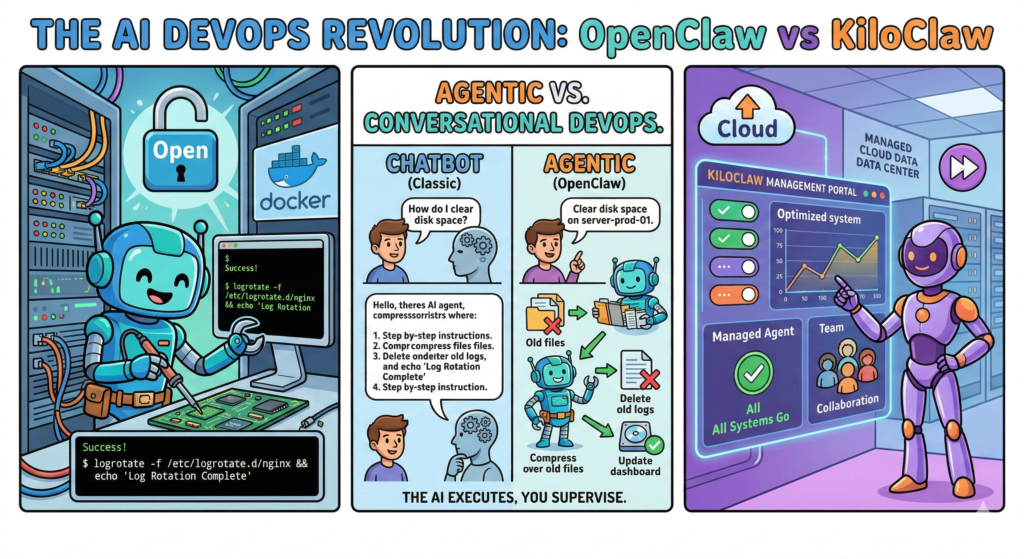
Instead of replying with a 10-step guide on how to fix a database replication lag, new AI systems can now accept the intent and execute the solution themselves. They are crossing the chasm from assistant to operator. At the forefront of this revolution are OpenClaw and its managed counterpart, KiloClaw.
These are not LLM frontends. They are autonomous, action-oriented infrastructure agents designed to handle operational toil.
What is OpenClaw? The Engineer’s New Teammate
OpenClaw is an open-source AI agent designed to operate within your infrastructure. It is designed to be self-hosted on your own hardware, virtual machines, or private cloud VPC.
The best mental model for OpenClaw is that of a junior DevOps engineer who never sleeps. It understands natural language, possesses deep system-level visibility, and has direct terminal access. Unlike a chatbot, which operates in a sandbox, OpenClaw interacts directly with the operating system and the network.
The Fundamental Capabilities of the Agent:
Unlike traditional monitoring scripts (which detect issues) or automation platforms like Ansible (which execute predefined plays), an AI agent operates dynamically. OpenClaw can:
- Execute Shell Commands: Run bash, Python, or custom binaries natively.
- Manage Files: Read, modify, and manage local or remote files configuration.
- Orchestrate APIs: Interacts with cloud providers (AWS, Azure, GCP), communication tools (Slack, Teams), and CI/CD pipelines (GitHub Actions, GitLab CI).
- Dynamically Solve Problems: It doesn’t just run a script; if a script fails, it reads the error output, modifies its own script, and tries again.
When you use OpenClaw, you don’t ask questions. You assign work.
Example Prompt: “Rotate logs in
/var/log/nginxolder than 7 days. Compress them, upload them to thebackup-vaultS3 bucket, and delete the local copies. Schedule this for 2 AM every night and send a summary to the#ops-alertsSlack channel.”
OpenClaw will then:
- Understand the comprehensive intent.
- Dynamically generate the necessary script.
- Check if the target directory exists.
- Execute the rotation and upload commands.
- Schedule the task via a persistent system (like crontab or its internal scheduler).
- Generate the confirmation report.
It is not just automating a task; it is performing a role.
A Direct Comparison: OpenClaw vs KiloClaw
While OpenClaw is the engine, KiloClaw is the managed vehicle. The core difference is operational overhead versus control.
| Feature | OpenClaw | KiloClaw |
| Model | Open Source | Managed SaaS |
| Hosting | Self-hosted (Private VPC, Prem) | Managed by KiloClaw (Hosted) |
| Setup Time | 1–4 hours (Config-dependent) | < 5 Minutes (Dashboard-based) |
| Security Responsibility | Yours (Critical) | Managed by Provider |
| Data Sovereignty | Total Control (Data never leaves your environment) | Entrusted to Provider |
| Integrations | Unlimited (via CLI/custom code) | Curated Library (Easy setup) |
| Maintenance | Your SRE team manages updates | Automatic platform updates |
| Ideal Users | Enterprise SRE, Compliance-heavy firms | Startups, Product Teams, Homelabs |
OpenClaw gives you full sovereignty and unlimited flexibility. KiloClaw gives you instant operational value without the overhead of maintaining the agent’s infrastructure.
Technical Deep Dive: Deploying and Sizing OpenClaw
If you choose the self-hosted path (OpenClaw), understanding how to properly deploy and size the agent is essential. An agent with terminal access requires respectful configuration.
Deployment Architectures
The most robust approach for self-hosting is deploying OpenClaw as a Docker container within a segmented network. Avoid running it directly on your primary production hosts.
OpenClaw usually requires three key environment variables/configurations to function:
- Access: Path to the target system (SSH key, local socket, or Docker socket).
- Permissions: A system user (e.g.,
ai-agent) mapped into the container. - Intelligence: The API key for your chosen LLM (e.g., GPT-4o, Claude 3.5 Sonnet, or an internal, fine-tuned model).
Sizing and VM Configuration
The primary constraint for OpenClaw is context window management rather than raw CPU processing power, especially if you are offloading the inference (the thinking) to an external LLM API (like OpenAI or Anthropic). The agent itself is lightweight.
However, if the agent is heavily processing large log files or performing local text-to-speech, sizing must adjust.
1. Minimum Viable Proof-of-Concept (Homelab / Testing)
This configuration is suitable for non-production tasks, basic script writing, and system monitoring.
- Instance Type: AWS t3.small / Azure B2s (or equivalent)
- vCPU: 1 or 2
- RAM: 2 GB
- Storage: 20 GB SSD
- Limitations: May struggle with large contexts or simultaneous complex operations.
2. Standard Operational Agent (Production / General DevOps)
This configuration is designed for robust daily use: alert response, routine log analysis, credential rotation, and multi-step CI/CD assistance.
- Instance Type: AWS t3.medium / t3a.medium / Azure D2as v5 (or equivalent)
- vCPU: 2 or 4
- RAM: 4 GB to 8 GB
- Storage: 50 GB to 100 GB SSD (High I/O for log processing)
- Recommended: Compute-optimized instances if the agent performs heavy data parsing.
3. Enterprise Platform Orchestrator (High-Scale / Large Context)
Use this sizing if the agent is the core orchestration hub for an entire Platform Engineering team, managing hundreds of resources, handling simultaneous deployments, or processing multiple multi-gigabyte log sources.
- Instance Type: AWS m6i.large / c6i.large / Azure D4s v5 (or equivalent)
- vCPU: 4 or 8
- RAM: 16 GB to 32 GB
- Storage: 200 GB+ SSD
- Requirements: High context window LLMs (128k+) are required for this level of operation.
The Security Imperative: Trusting the Agent
This is the most critical discussion. An agent with terminal access, filesystem control, and API keys is inherently dangerous if improperly managed. A vulnerability in the agent is a vulnerability in your entire infrastructure.
You must treat an operational AI agent exactly like a powerful CI/CD runner.
Security Best Practices for Self-Hosting OpenClaw
- Never Run as Root: The agent must run as a dedicated, low-privilege user (e.g.,
openclaw-agent). It should never have default root access. - Granular Sudo Access: If the agent needs elevated privileges (e.g., to restart Nginx), provide sudo access only for that specific command:
openclaw-agent ALL=(root) NOPASSWD: /usr/sbin/service nginx restart. Do not provideNOPASSWD: ALL. - Strict File Isolation: Use read-only mounts where possible. Map only the specific directories the agent needs access to (e.g.,
/var/log/apps/but never/etc/or/home/user/). - Audit Everything: Maintain a strict, append-only log of every single command the agent executes. OpenClaw provides this audit trail by default; you must ensure it is actively monitored and shipped to an external SIEM if possible.
- Compute-Level Segmentation: Do not run the agent on your primary production database server. Run the agent on its own VM or in an isolated Kubernetes namespace, and have it connect externally (e.g., via SSH or API) to the target systems.
The Big Picture: Operator to Orchestrator
The arrival of agentic DevOps tools changes the trajectory of the engineering role. For fifteen years, we have optimized for faster feedback loops. Now, we are optimizing for autonomous operational systems.
The impact is not the replacement of DevOps engineers. It is a fundamental shift in what engineers spend their time doing.
The Shift in Operational Duties
| Historical DevOps Work | Modern Agentic DevOps Work |
| Writing small automation scripts | Defining operational policies and goals |
| Responding to log alerts | Designing diagnostic and repair procedures |
| Manually rotating credentials | Hardening agent permissions and scopes |
| Reviewing system health dashboards | Auditing agent performance and decision logs |
The shift is from Operator $\rightarrow$ Orchestrator. The SRE of the future will not be the primary system operator; they will be the manager of the agents that operate the system.
Final Thoughts
OpenClaw and KiloClaw are not just another tool in the DevOps stack. They represent the next logical step in infrastructure management. For the first time, you can define an operational outcome in plain English, and a system can take the necessary actions to realize that outcome reliably.
This shift will not eliminate DevOps. It will finally allow DevOps teams to do what they were meant to do: Design resilient, efficient systems, rather than simply babysitting the ones they already have.
Leave a Reply